之前提及過,啟動Service有兩種方式:startService 與 bindService。前者已經說過如何使用,所以,這篇貼子主要是關於 bind service的。 這裡所討論的是僅針對那些被綁定的service的,而那些既被startService() 又被 bindService() 的 service 不在此範圍內。
1 Bind Service就像是C/S架構中的服務端,其他組件(比如 Activity)綁定到它(通過 bindService()),可以向它發送請求,可以接受從它返回的響應,它甚至還提供了進程間通信(IPC)功能。
2 一個service要想能夠被其他組件綁定,那麼它的 onBind() 方法必須被實現,且必須返回一個 IBinder 對象,然後其他組件可以通過這個 IBinder 對象與該 service 進行通訊。
3 多個client可以綁定至同一個service,但該 service 的onBind() 方法只會在第一個 client 綁定至其的時候被調用,當其他 client 再次綁定到它的時候,並不會調用  onBind() 方法,而是直接返回第一次被調用時產生的那個 IBinder 對象。也就是說,在其生命週期內,onBind() 只會被調用一次。
4 Bind Service 的生命週期如下圖所示:

 
5 Bind Service 不會在後台無限期的一直運行,而是當所有綁定至其的組件都調用了 unbindService() 進行解綁之後,系統就會將其停掉以回收資源。
 
6 當我們要實現一個 Bind Service 的時候,最重要的就是實現它的 onBind() 方法以返回一個 IBinder 對像
 
要生成一個 Bound Service ,共有三種方式:繼承自 Binder 類,使用 Messenger ,使用 AIDL。下面且聽小生一一道來。
第一種:繼承自 Binder 類
需要注意的是,這種方式僅僅適用於這種場合:service 與 application 在同一個進程中。這種場合也是最最常見的。
它分以下幾個步驟:
a. 在你的 service 類中聲明一個內部類來繼承 Binder 類。在該內部類中,最好提供一個公共方法來返回你的 service 實例。
b. 在你的 service 類中需要聲明一個這個內部類的實例,以供在 onBind() 方法中返回
c. 在 client 端,在 onServiceConnected() 方法中得到從 onBind() 方法中返回的 IBinder 對象,然後可以通過該 對像中的公共方法得到相應的 service 實例,正如 第一個步驟 所說的那樣。
d. 在 service 中提供公共方法, 這樣就可以在組件(如 Activity 中調用這些公共方法了)
 
下面給出一例:
service 代碼


Java代碼  收藏代码


  1. public class BindServiceWithIBinder extends Service {  

  2.   

  3.     private static final String TAG = "BindServiceWithIBinder";  

  4.   

  5.     private final MyIBinder myIBinder = new MyIBinder();  

  6.   

  7.     /** 

  8.      * bindService() 時,調用的是這個方法,而非 onStartCommnad() 方法 

  9.      */  

  10.     @Override  

  11.     public IBinder onBind(Intent intent) {  

  12.         // 在主 Activity 上的 TextView 中打印出一行LOG  

  13.         MyServiceActivity.vh.sendMessage(MyServiceActivity.createMessage(  

  14.                 MyServiceActivity.UPDATE_VIEW, TAG + " ----> onBind"));  

  15.         return myIBinder;  

  16.     }  

  17.   

  18.     @Override  

  19.     public void onCreate() {  

  20.         MyServiceActivity.vh.sendMessage(MyServiceActivity.createMessage(  

  21.                 MyServiceActivity.UPDATE_VIEW, TAG + " ----> onCreate"));  

  22.     }  

  23.   

  24.     @Override  

  25.     public void onDestroy() {  

  26.         MyServiceActivity.vh.sendMessage(MyServiceActivity.createMessage(  

  27.                 MyServiceActivity.UPDATE_VIEW, TAG + " ----> onDestroy"));  

  28.     }  

  29.   

  30.     @Override  

  31.     public void onRebind(Intent intent) {  

  32.         MyServiceActivity.vh.sendMessage(MyServiceActivity.createMessage(  

  33.                 MyServiceActivity.UPDATE_VIEW, TAG + " ----> onRebind"));  

  34.     }  

  35.   

  36.     @Override  

  37.     public int onStartCommand(Intent intent, int flags, int startId) {  

  38.         MyServiceActivity.vh.sendMessage(MyServiceActivity.createMessage(  

  39.                 MyServiceActivity.UPDATE_VIEW, TAG + " ----> onStartCommand"));  

  40.         return START_STICKY;  

  41.     }  

  42.   

  43.     @Override  

  44.     public boolean onUnbind(Intent intent) {  

  45.         MyServiceActivity.vh.sendMessage(MyServiceActivity.createMessage(  

  46.                 MyServiceActivity.UPDATE_VIEW, TAG + " ----> onUnbind"));  

  47.         return super.onUnbind(intent);  

  48.     }  

  49.   

  50.     /** 

  51.      * 聲明一個 Binder 類的實現類,供在 onBind() 方法中返回該類的一個實例 

  52.      * @author 001718 

  53.      * 

  54.      */  

  55.     public class MyIBinder extends Binder {  

  56.         public Service getService() {  

  57.             MyServiceActivity.vh.sendMessage(MyServiceActivity.createMessage(  

  58.                     MyServiceActivity.UPDATE_VIEW,  

  59.                     "BindServiceWithIBinder.MyIBinder.getService()"));  

  60.             return BindServiceWithIBinder.this;  

  61.         }  

  62.     }  

  63.   

  64.     /** 

  65.      * service 提供的公共方法,在activity中可以調用 

  66.      */  

  67.     public void download() {  

  68.         try {  

  69.             MyServiceActivity.vh.sendMessage(MyServiceActivity.createMessage(  

  70.                     MyServiceActivity.UPDATE_VIEW, TAG  

  71.                             + " ----> download(): 文件下載中..."));  

  72.             Thread.sleep(3000);  

  73.             MyServiceActivity.vh.sendMessage(MyServiceActivity.createMessage(  

  74.                     MyServiceActivity.UPDATE_VIEW, TAG  

  75.                             + " ----> download(): 文件下載完成..."));  

  76.         } catch (InterruptedException e) {  

  77.             e.printStackTrace();  

  78.         }  

  79.     }  

  80. }  


 主 Activity 中的相應關鍵代碼為:


Java代碼  收藏代码


  1. private void doUnbindService() {  

  2.         if (isBound) {  

  3.             unbindService(myLocalServiceConnection);  

  4.             isBound = false;  

  5.         }  

  6.     }  

  7.   

  8.     private void doBindService() {  

  9.         Log.i("bind""begin to bind");  

  10.         bindService(intent, myLocalServiceConnection, Context.BIND_AUTO_CREATE);  

  11.   

  12.     }  

  13.   

  14.     private ServiceConnection myLocalServiceConnection = new ServiceConnection() {  

  15.         public void onServiceConnected(android.content.ComponentName name,  

  16.                 android.os.IBinder service) {  

  17.             MyServiceActivity.vh.sendMessage(MyServiceActivity.createMessage(  

  18.                     MyServiceActivity.UPDATE_VIEW,  

  19.                     "myServiceConnection.onServiceConnected"));  

  20.             // 因為 客戶端 與 服務 在同一個進程內,這樣一來,就可以知道參數 "service"的類型了,也就可以進行顯示的強制類型轉換了。  

  21.             // 而如果 客戶端與服務不在同一個進程中的話,那麼此處是不可以進行顯示強制類型轉換的,  

  22.             // 因為,通過Debug,可以發現此時傳進來的 Service 的類型是 BinderProxy  

  23.             MyIBinder myIBinder = (MyIBinder) service;  

  24.             bsi = (BindServiceWithIBinder) myIBinder.getService();  

  25.             isBound = true;  

  26.   

  27.             bsi.download();  

  28.         };  

  29.   

  30.         public void onServiceDisconnected(android.content.ComponentName name) {  

  31.             MyServiceActivity.vh.sendMessage(MyServiceActivity.createMessage(  

  32.                     MyServiceActivity.UPDATE_VIEW,  

  33.                     "myServiceConnection.onServiceDisconnected"));  

  34.             isBound = false;  

  35.         };  

  36.     };  


 下面來看運行效果:
連續點擊兩次 Bind Service

  
從此圖中可以看出,bind service 的響應過程。也可以看到,第二次點擊時,service 沒作任何反應,因為當前 Activity 在第一次點擊後就已經跟此service綁定了。
點擊 Unbind Service

 至此,該 service 的生命週期結束,它也會被系統給停掉以回收資源。
 

Felix 發表在 痞客邦 留言(0) 人氣()


不管是何種Service,它默認都是在應用程序的主線程(亦即UI線程)中運行的。所以,如果你的Service將要運行非常耗時或者可能被阻塞的操作時,你的應用程序將會被掛起,甚至會出現ANR錯誤。為了避免這一問題,你應該在Service中重新啟動一個新的線程來進行這些操作。現有兩種方法共大家參考:
1 直接在Service的onStartCommand()方法中重啟一個線程來執行,如:


Java代碼  收藏代码


  1. @Override  

  2.     public int onStartCommand(Intent intent, int flags, int startId) {  

  3.         MyServiceActivity.updateLog(TAG + " ----> onStartCommand()");  

  4.         new Thread(new Runnable() {  

  5.             @Override  

  6.             public void run() {  

  7.                 // 此處進行耗時的操作,這裡只是簡單地讓線程睡眠了1s  

  8.                 try {  

  9.                     Thread.sleep(1000);  

  10.                 } catch (Exception e) {  

  11.                     e.printStackTrace();  

  12.                 }  

  13.             }  

  14.         }).start();  

  15.         return START_STICKY;  

  16.     }  


 2 Android SDK 中為我們提供了一個現成的Service類來實現這個功能,它就是IntentService,它主要負責以下幾個方面:
   

  • Creates a default worker thread that executes all intents delivered to onStartCommand() separate from your application's main thread.


  •     生成一個默認的且與主線程互相獨立的工作者線程來執行所有傳送至 onStartCommand() 方法的Intetnt

  • Creates a work queue that passes one intent at a time to your onHandleIntent() implementation, so you never have to worry about multi-threading.


  •     生成一個工作隊列來傳送Intent對像給你的onHandleIntent()方法,同一時刻只傳送一個Intent對象,這樣一來,你就不必擔心多線程的問題。

  • Stops the service after all start requests have been handled, so you never have to call stopSelf().


  •     在所有的請求(Intent)都被執行完以後會自動停止服務,所以,你不需要自己去調用stopSelf()方法來停止該服務

  • Provides default implementation of onBind() that returns null.


  •     提供了一個onBind()方法的默認實現,它返回null

  • Provides a default implementation of onStartCommand() that sends the intent to the work queue and then to your onHandleIntent() implementation


  •     提供了一個onStartCommand()方法的默認實現,它將Intent先傳送至工作隊列,然後從工作隊列中每次取出一個傳送至onHandleIntent()方法,在該方法中對Intent對相應的處理
     
    以上,英文來自官方SDK,中文為我所譯。
     
    從以上看來,你所需要做的就是實現 onHandleIntent() 方法,在該方法內實現你想進行的操作。另外,繼承IntentService時,你必須提供一個無參構造函數,且在該構造函數內,你需要調用父類的構造函數,如下:


    Java代碼  收藏代码


    1. public HelloIntentService() {        

    2.     super("HelloIntentService");    

    3. }  


    下面給出一例,來解釋一下:


    Java代碼  收藏代码


    1. // activity 的onCreate()  

    2. @Override  

    3.     public void onCreate(Bundle savedInstanceState) {  

    4.         super.onCreate(savedInstanceState);  

    5.         setContentView(R.layout.main);  

    6.   

    7.         startSer1 = (Button) findViewById(R.id.startSer1);  

    8.         stopSer1 = (Button) findViewById(R.id.stopSer1);  

    9.   

    10.         startSer2 = (Button) findViewById(R.id.startSer2);  

    11.         stopSer2 = (Button) findViewById(R.id.stopSer2);  

    12.   

    13.         log = (TextView) findViewById(R.id.log);  

    14.   

    15.         logView = (ScrollView) findViewById(R.id.logView);  

    16.   

    17.         startSer1.setOnClickListener(btnListener);  

    18.         stopSer1.setOnClickListener(btnListener);  

    19.   

    20.         startSer2.setOnClickListener(btnListener);  

    21.         stopSer2.setOnClickListener(btnListener);  

    22.   

    23.         intent = new Intent(MyServiceActivity.this, IntentServiceDemo.class);  

    24.   

    25.         // 打印出主線程的ID  

    26.         long id = Thread.currentThread().getId();  

    27.         updateLog(TAG + " ----> onCreate() in thread id: " + id);  

    28.     }  


    Java代碼  收藏代码


    1. // service 代碼  

    2. package com.archer.rainbow;  

    3.   

    4. import java.text.SimpleDateFormat;  

    5. import java.util.Date;  

    6.   

    7. import android.app.IntentService;  

    8. import android.content.Intent;  

    9.   

    10. public class IntentServiceDemo extends IntentService {  

    11.     private static final String TAG = "IntentServiceDemo";  

    12.     private static final SimpleDateFormat SDF_DATE_FORMAT = new SimpleDateFormat("yyyy/MM/dd hh:mm:ss.SSS");  

    13.   

    14.     public IntentServiceDemo() {  

    15.         super(TAG);  

    16.         MyServiceActivity.updateLog(TAG + " ----> constructor");  

    17.     }  

    18.   

    19.     @Override  

    20.     public void onCreate() {  

    21.         super.onCreate();  

    22.   

    23.         // 打印出該Service所在線程的ID  

    24.         long id = Thread.currentThread().getId();  

    25.         MyServiceActivity.updateLog(TAG + " ----> onCreate() in thread id: "  

    26.                 + id);  

    27.     }  

    28.   

    29.     @Override  

    30.     public void onDestroy() {  

    31.         super.onDestroy();  

    32.         MyServiceActivity.updateLog(TAG + " ----> onDestroy()");  

    33.     }  

    34.   

    35.     @Override  

    36.     public int onStartCommand(Intent intent, int flags, int startId) {  

    37.         MyServiceActivity.updateLog(TAG + " ----> onStartCommand()");  

    38.         // 記錄發送此請求的時間  

    39.         intent.putExtra("time", System.currentTimeMillis());  

    40.         return super.onStartCommand(intent, flags, startId);  

    41.     }  

    42.   

    43.     @Override  

    44.     public void setIntentRedelivery(boolean enabled) {  

    45.         MyServiceActivity.updateLog(TAG + " ----> setIntentRedelivery()");  

    46.         super.setIntentRedelivery(enabled);  

    47.     }  

    48.   

    49.     @Override  

    50.     protected void onHandleIntent(Intent intent) {  

    51.         // 打印出處理intent所用的線程的ID  

    52.         long id = Thread.currentThread().getId();  

    53.         MyServiceActivity.updateLog(TAG  

    54.                 + " ----> onHandleIntent() in thread id: " + id);  

    55.         long time = intent.getLongExtra("time"0);  

    56.         Date date = new Date(time);  

    57.         try {  

    58.             // 打印出每個請求對應的觸發時間  

    59.             MyServiceActivity.updateLog(TAG  

    60.                     + " ----> onHandleIntent(): 下載文件中..." + SDF_DATE_FORMAT.format(date));  

    61.             Thread.sleep(3000);  

    62.         } catch (InterruptedException e) {  

    63.             e.printStackTrace();  

    64.         }  

    65.     }  

    66.   

    67. }  


     應用啟動時,界面如下:

     從此圖可以看出,主線程(UI線程)的ID是1。接,連續點擊三次Start Service 1 按鈕,得如下畫面:

     
     從此圖中可以看出,IntentServiceDemo的onCreate()所處的線程ID仍為1,說明它是在主線程中被執行的,且只被執行一次。然後,我每點擊一次按鈕,它都會觸發一下onStartCommand()方法。仔細看第二次與第三次的onCommand()方法以及onHandleIntent()打印出來的語句,你會發現,第二、三兩次點擊按鈕與第一次點擊按鈕的時間是沒有超過3秒鐘的,它們是連續被執行的,這說明了什麼呢?說明,在第一個intent被處理時(即onHandleIntent()處於運行中),該Service仍然可以接受新的請求,但接受到新的請求後並沒有立即執行,而是將它們放入了工作隊列中,等待被執行。
     
    這就是 IntentService 的簡單用法。但你若是想在Service中讓多個線程並發的話,就得另想法子嘍。比如,使用第一種方法,在Service內部起多個線程,但是這樣的話,你可要處理好線程的同步哦~~~ 
     

    Felix 發表在 痞客邦 留言(0) 人氣()


    們有兩種方式(start與bind)啟動一個Service,每一種方式啟動的Service生命週期是不一樣的,這篇貼子主要寫的是 start service。
    它的生命週期中只有三個階段:onCreate, onStartCommand(取代原來的onStart方法), onDestroy。如下圖:

     
    需要注意的有:
    1 如果是 調用者 直接退出而沒有調用 stopService 的話,那麼被啟動的 Service 會一直在後台運行,直至其stopService 方法被調用,或者它自己調用stopSelf 方法。
    2 在服務未被創建時,系統會先調用服務的onCreate()方法,接著調用onStartCommand()方法。如果調用startService()方法前服務已經被創建,那麼會直接調用onStartCommand()方法。也就是說,多次調用startService()方法並不會導致多次創建服務。另外,不管被 start 多少次,只需一次 stop 便可將相應的service關閉。
    3 具體的操作應該放在 onStartCommand() 裡面
    以下通過截圖來看:

    上圖的中的四個按鈕均是針對於同一個Service進行的操作,此時去 application ,可以查看到 "Running Service" 的列表如下:


    這個,我們去點擊上面的按鈕(分別點擊startservice 1 和 2 各兩次),結果如下:

     從圖中,我們可以看出, onCreate() 方法只在第一次創建服務的時候被調用了。
    現在,通過「返回鍵」來退回至主界面,然後再去 application 的 running service中去查看,可得下面的截圖:

     從此圖中,我們可以看出,雖然Activity被finish掉了,但是由它啟動的service仍然在後台運行著。
    此時,重新打開該應用,然後直接點擊 stop service 1 和 2 按鈕各兩次(不需再新點擊 start service按鈕),可以如下截圖:

     從此圖中我們可以看出,只有第一次停止服務的時候,才會調用 onDestroy() 方法。
    此時,再去 application 的 running service中去查看,可得下面的截圖,發現服務確實已經被停止了:

     
    下面附上部分源碼(具體地請參見附件):


    Java代碼  收藏代码


    1. // 四個按鈕的響應事件  

    2.   

    3. private OnClickListener btnListener = new OnClickListener() {  

    4.         @Override  

    5.         public void onClick(View v) {  

    6.             switch (v.getId()) {  

    7.                 case R.id.startSer1:  

    8.                     updateLog("Start Service 1 pressed");  

    9.                      // 啟動服務(如果想傳遞數據,也可以將其封裝進該intent)  

    10.                     startService(intent);  

    11.                     break;  

    12.                 case R.id.startSer2:  

    13.                     updateLog("Start Service 2 pressed");  

    14.                     startService(intent);  

    15.                     break;  

    16.                 case R.id.stopSer1:  

    17.                     updateLog("Stop Service 1 pressed");  

    18.                     // 停止服務  

    19.                     stopService(intent);  

    20.                     break;  

    21.                 case R.id.stopSer2:  

    22.                     updateLog("Stop Service 2 pressed");  

    23.                     stopService(intent);  

    24.                     break;  

    25.                 default:  

    26.                     break;  

    27.             }  

    28.         }  

    29.     };  


    Java代碼  收藏代码


    1. // service 的實現  

    2. public class MyService extends Service {  

    3.     private static final String TAG = "MyService";  

    4.   

    5.     @Override  

    6.     public void onCreate() {  

    7.         super.onCreate();  

    8.         MyServiceActivity.updateLog(TAG + " ----> onCreate()");  

    9.     }  

    10.   

    11.     @Override  

    12.     public int onStartCommand(Intent intent, int flags, int startId) {  

    13.         MyServiceActivity.updateLog(TAG + " ----> onStartCommand()");  

    14.         return START_STICKY;  

    15.     }  

    16.   

    17.     @Override  

    18.     public IBinder onBind(Intent intent) {  

    19.         MyServiceActivity.updateLog(TAG + " ----> onBind()");  

    20.         return null;  

    21.     }  

    22.   

    23.     @Override  

    24.     public void onDestroy() {  

    25.         super.onDestroy();  

    26.         MyServiceActivity.updateLog(TAG + " ----> onDestroy()");  

    27.     }  

    28. }  


    Felix 發表在 痞客邦 留言(0) 人氣()

    Windows Registry Editor Version 5.00
    [HKEY_LOCAL_MACHINE\SOFTWARE\Microsoft\Windows NT\CurrentVersion\Winlogon]
    "ForceAutoLogon"="1"
    "AutoAdminLogon"="1"
    "DefaultUserName"="sales"
    "DefaultPassword"="mypassword"
    "DefaultDomainName"="name"

    Felix 發表在 痞客邦 留言(0) 人氣()

    Installing Active Directory Tools Under Windows 7
     
    This blog post is a step-by-step guide to installing the Active Directory Tools (i.e. Active Directory Users and Computers) on a Windows 7 machine. It has been tested on Windows 7 Enterprise but will probably work with Professional or Ultimate as well - Home users it will not work (but then why are you wanting to administer AD from a home machine??!!)
    First of all you need to download the software from Microsoft. In the Microsoft Download Centre these are called "Remote Server Administration Tools for Windows 7" a direct link to the download page is given below;
    http://www.microsoft.com/downloads/details.aspx?displaylang=en&FamilyID=7d2f6ad7-656b-4313-a005-4e344e43997d
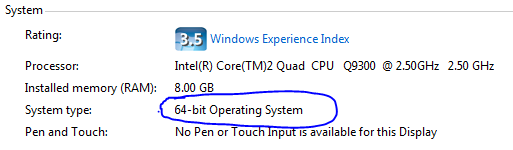
    If you scroll down to the "Files in This Download" section of the page you'll see two files. Depending on whether or not you're running 32-bit or 64-bit Windows 7 you need to pick the correct file. If you're unsure of which version you're running then go to the start button, right-click "Computer" and then select "Properties". You'll see something like this;


    System Information (64-bit/32-bit)


    Look at the "System type:" value and you'll see what version of Windows you're running.
    If you're running 32-bit then you need to download the file which starts "x86..." (currently this is"x86fre_GRMRSAT_MSU.msu" but it might change). For 64-bit users you need to download the file which begins "amd64..." (currently this is "amd64fre_GRMRSATX_MSU.msu") - this is true even if you're running a non-AMD 64-bit processor. The reason for this I'll leave Microsoft to explain ...
    Once you've got the file install it (it's a standard KB update file).
    After it's been successfully installed go to the Start Menu > Control Panel and select "Programs";


    "Turn Windows Features on or off" under "Programs and Features"


    The "Windows Features" dialog box will be displayed, scroll down to "Role Administration Tools" (under "Remote Server Administration Tools") and select the the following items;


    "Windows Features" dialog


    Click "OK" to make the changes.
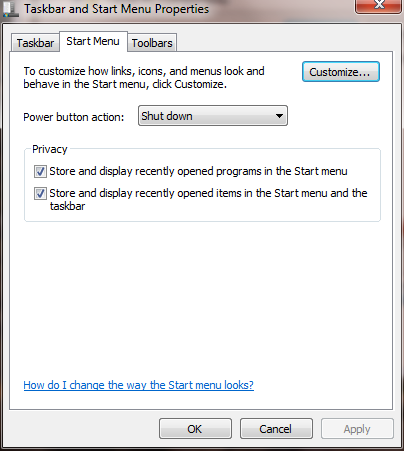
    In order to make finding these under the Start Menu a little easier right-click the Start Button and select "Properties";


    Taskbar and Start Menu Properties


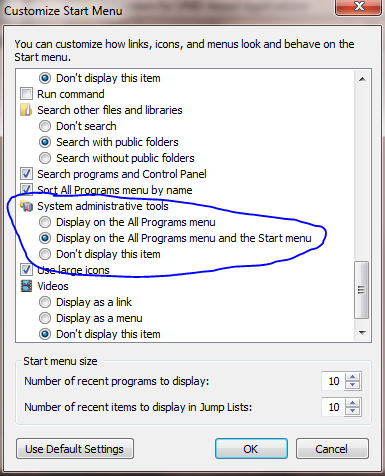
    Select "Customize ..." and then scroll down the list until you see "System administrative tools" and choose where you want the tools to display;


    Customize Start Menu


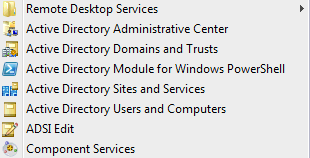
    Under the Start Menu you will now see an "Administrative Tools" option, under this you'll see the new AD Tools;


    Active Directory Start Menu Items


    NOTE: Sometimes a reboot is required to pick up these changes!

    Felix 發表在 痞客邦 留言(0) 人氣()


    If you have ever done system administration, you probably have the problem where you connect to so many servers that you have no idea which computer you are connected to half the time. BGInfo is a great utility that lets you display useful system information right on the desktop. And it works for regular Windows users as well.
    SCHOOL NAVIGATION

    1. What Are the SysInternals Tools and How Do You Use Them?

    2. Understanding Process Explorer

    3. Using Process Explorer to Troubleshoot and Diagnose

    4. Understanding Process Monitor

    5. Using Process Monitor to Troubleshoot and Find Registry Hacks

    6. Using Autoruns to Deal with Startup Processes and Malware

    7. Using BgInfo to Display System Information on the Desktop

    8. Using PsTools to Control Other PCs from the Command Line

    9. Analyzing and Managing Your Files, Folders, and Drives

    10. Wrapping Up and Using the Tools Together


    Felix 發表在 痞客邦 留言(0) 人氣()


    You can create GPO and link the GPO to domain or OU containing all the computers.
     

    Step 1 : Creating a Security Group

    Felix 發表在 痞客邦 留言(0) 人氣()

    解決 PHP/mySQL 資料庫讀取中文顯示亂碼或問號

    發佈時間: 2011-01-09 週日

    Felix 發表在 痞客邦 留言(0) 人氣()

    大部分Linux發行版的默認賬戶是普通用戶,而更改系統文件或者執行某些命令,需要root身份才能進行,這就需要從當前用戶切換到root用戶,Linux中切換用戶的命令是su或su -,下面就su命令和su -命令最大的本質區別給大家詳解一下:  
    前者只是切換了root身份,但Shell環境仍然是普通用戶的Shell;而後者連用戶和Shell環境一起切換成root身份了。只有切換了Shell環境才不會出現PATH環境變量錯誤。su切換成root用戶以後,pwd一下,發現工作目錄仍然是普通用戶的工作目錄;而用su -命令切換以後,工作目錄變成root的工作目錄了。用echo $PATH命令看一下su和su - 以後的環境變量有何不同。以此類推,要從當前用戶切換到其它用戶也一樣,應該使用su -命令。 
    打個比方:在普通用戶下輸入:
    $pwd
    /home/test (當前用戶目錄)
    $su ******
     (輸入密碼)
    #pwd (再次查看路徑)

    /home/test (還是當前用戶目錄)
    但是如果換成su -
    的話結果如下:
    $pwd

    /home/test(當前用戶目錄)
    $su -

    ****** (輸入密碼)
    #pwd (再次查看路徑)

    /root (切換到超級用戶目錄)

    Felix 發表在 痞客邦 留言(0) 人氣()

    linux下打印錯誤報告 sudo tail /var/log/httpd/error_log
     
    顯示如下錯誤:phpMyAdmin\libraries\php-gettext\gettext.inc on line 177Fatal error:

    Felix 發表在 痞客邦 留言(0) 人氣()


    很多第一次配置apache的虛擬主機的時候,以為配置第一個虛擬主機完成以後,以後就不會出現什麼問題了。
    在配置第一個虛擬主機的時候,重啟apache的時候,都可能會遇到下面的問題:


    [warn] _default_ VirtualHost overlap on port 80, the first has precedence

    Felix 發表在 痞客邦 留言(0) 人氣()

    為了更好的管理Android應用的用戶界面裡的個組件,Android提供了佈局管理器,通過佈局管理器,Android應用的圖形用戶界面具有良好的平台無關性。這裡什麼叫平台的無關性呢?就是說不同手機。我們知道不同手機它們的屏幕的分辨率、尺寸並不完全相同,而Android的佈局管理器可以根據運行平台來調整組件的大小,而我們所需要做的就是選擇合適的佈局管理器。
     與Swing編程不同的是,Android的佈局管理器本身就是一個UI組件,所有的佈局管理器都是ViewGroup的子類:


    Felix 發表在 痞客邦 留言(0) 人氣()

    Blog Stats
    ⚠️

    成人內容提醒

    本部落格內容僅限年滿十八歲者瀏覽。
    若您未滿十八歲,請立即離開。

    已滿十八歲者,亦請勿將內容提供給未成年人士。