轉自 http://www.cnblogs.com/xiaoluo501395377/p/3430542.html
本篇隨筆將講解一下Android的多線程的知識,以及如何通過AsyncTask機制來實現線程之間的通信。
一、Android當中的多線程
在Android當中,當一個應用程序的組件啟動的時候,並且沒有其他的應用程序組件在運行時,Android系統就會為該應用程序組件開闢一個新的線程來執行。默認的情況下,在一個相同Android應用程序當中,其裡面的組件都是運行在同一個線程裡面的,這個線程我們稱之為Main線程。當我們通過某個組件來啟動另一個組件的時候,這個時候默認都是在同一個線程當中完成的。當然,我們可以自己來管理我們的Android應用的線程,我們可以根據我們自己的需要來給應用程序創建額外的線程。
Felix 發表在 痞客邦 留言(1) 人氣(10,973)
原創作品,允許轉載,轉載時請務必以超鏈接形式標明文章 原始出處 、作者信息和本聲明。否則將追究法律責任。http://liangruijun.blog.51cto.com/3061169/655014
ToggleButton(開關按鈕)是Android系統中比較簡單的一個組件,是一個具有選中和未選擇狀態雙狀態的按鈕,並且需要為不同的狀態設置不同的顯示文本。
ToggleButton常用的XML屬性
屬性名稱
|
描述
|
android:disabledAlpha
|
設置按鈕在禁用時透明度。
|
android:textOff
|
未選中時按鈕的文本
|
android:textOn
|
選中時按鈕的文本
|
下面是具體的例子:
第一個例子是通過Toast顯示ToggleButton不同的狀態時的信息
MainActivity.java
package com.android.togglebutton;
import android.app.Activity;
import android.os.Bundle;
import android.view.View;
import android.view.View.OnClickListener;
import android.widget.Toast;
import android.widget.ToggleButton;
public class MainActivity extends Activity {
private ToggleButton togglebutton;
@Override
public void onCreate(Bundle savedInstanceState) {
super.onCreate(savedInstanceState);
setContentView(R.layout.main);
togglebutton = (ToggleButton) findViewById(R.id.togglebutton);
togglebutton.setOnClickListener(new OnClickListener() {
public void onClick(View v) {
if (togglebutton.isChecked()) {
Toast.makeText(MainActivity.this, "你喜歡球類運動", Toast.LENGTH_SHORT).show();
}
else {
Toast.makeText(MainActivity.this, "你不喜歡球類運動", Toast.LENGTH_SHORT).show();
}
}
});
}
}
main.xml
<?xml version="1.0" encoding="utf-8"?>
<LinearLayout xmlns:android="http://schemas.android.com/apk/res/android"
android:orientation="vertical"
android:layout_width="fill_parent"
android:layout_height="fill_parent"
>
<TextView
android:layout_width="fill_parent"
android:layout_height="wrap_content"
android:text="@string/hello"
/>
<ToggleButton
android:id="@+id/togglebutton"
android:layout_width="wrap_content"
android:layout_height="wrap_content"
android:textOn="喜歡"
android:textOff="不喜歡"
/>
</LinearLayout>
strings.xml
<?xml version="1.0" encoding="utf-8"?>
<resources>
<string name="hello">你喜不喜歡球類運動?</string>
<string name="app_name">測試ToggleButton</string>
</resources>
效果圖:
第二個例子通過圖片的變化顯示ToggleButton不同的狀態時的圖片
MainActivity.java
package com.android.togglebutton;
import android.app.Activity;
import android.os.Bundle;
import android.widget.CompoundButton;
import android.widget.CompoundButton.OnCheckedChangeListener;
import android.widget.ImageView;
import android.widget.ToggleButton;
public class MainActivity extends Activity {
private ImageView imageView;
private ToggleButton toggleButton;
@Override
public void onCreate(Bundle savedInstanceState) {
super.onCreate(savedInstanceState);
setContentView(R.layout.main);
imageView=(ImageView) findViewById(R.id.imageView);
toggleButton=(ToggleButton)findViewById(R.id.toggleButton);
toggleButton.setOnCheckedChangeListener(new OnCheckedChangeListener(){
public void onCheckedChanged(CompoundButton buttonView,boolean isChecked) {
toggleButton.setChecked(isChecked);
imageView.setImageResource(isChecked?R.drawable.pic_on:R.drawable.pic_off);
}
});
}
}
main.xml
<?xml version="1.0" encoding="utf-8"?>
<LinearLayout xmlns:android="http://schemas.android.com/apk/res/android"
android:orientation="vertical"
android:layout_width="fill_parent"
android:layout_height="fill_parent">
<ImageView
android:id="@+id/imageView"
android:layout_width="wrap_content"
android:layout_height="wrap_content"
android:src="@drawable/pic_off"
android:layout_gravity="center_horizontal"
/>
<ToggleButton
android:id="@+id/toggleButton"
android:layout_width="130dip"
android:layout_height="wrap_content"
android:textOn="開燈"
android:textOff="關燈"
android:layout_gravity="center_horizontal"
/>
</LinearLayout>
效果圖:
本文出自 「
IT的點點滴滴」 博客,請務必保留此出處
http://liangruijun.blog.51cto.com/3061169/655014
Felix 發表在 痞客邦 留言(0) 人氣(6,612)
要做一個Service要先了解,service無法自己啟動,必須要靠startService()才能啟動。
同樣的啟動後也必須要使用stopService()關閉。
在這邊需要注意的有幾點
1) startService()
2) stopService()
3) AndroidManiFest.xml增加service權限
第一點為開啟service必要條件,當然你要new一個intent
所以就是:
Intent intent = new Intent(MainActivity.this,service_class.class);
startService(intent);
MainActivity為你目前的class,service_class則是另外開的java檔(那邊則是寫service做的事情)
第二點跟第一點很類似,只有差在start / stop的差別
Intent intent = new Intent(MainActivity.this,service_class.class);
stopService(intent);
第三點就是你需要在Android ManiFest.xml裡面新增權限
否則跑起來會有
"
Felix 發表在 痞客邦 留言(0) 人氣(11,303)

Se
rvice的種類
按運行地點分類:
Felix 發表在 痞客邦 留言(0) 人氣(2,496)

之前提及過,啟動Service有兩種方式:startService 與 bindService。前者已經說過如何使用,所以,這篇貼子主要是關於 bind service的。 這裡所討論的是僅針對那些被綁定的service的,而那些既被startService() 又被 bindService() 的 service 不在此範圍內。
1 Bind Service就像是C/S架構中的服務端,其他組件(比如 Activity)綁定到它(通過 bindService()),可以向它發送請求,可以接受從它返回的響應,它甚至還提供了進程間通信(IPC)功能。
2 一個service要想能夠被其他組件綁定,那麼它的 onBind() 方法必須被實現,且必須返回一個 IBinder 對象,然後其他組件可以通過這個 IBinder 對象與該 service 進行通訊。
3 多個client可以綁定至同一個service,但該 service 的onBind() 方法只會在第一個 client 綁定至其的時候被調用,當其他 client 再次綁定到它的時候,並不會調用 onBind() 方法,而是直接返回第一次被調用時產生的那個 IBinder 對象。也就是說,在其生命週期內,onBind() 只會被調用一次。
4 Bind Service 的生命週期如下圖所示:
5 Bind Service 不會在後台無限期的一直運行,而是當所有綁定至其的組件都調用了 unbindService() 進行解綁之後,系統就會將其停掉以回收資源。
6 當我們要實現一個 Bind Service 的時候,最重要的就是實現它的 onBind() 方法以返回一個 IBinder 對像
要生成一個 Bound Service ,共有三種方式:繼承自 Binder 類,使用 Messenger ,使用 AIDL。下面且聽小生一一道來。
第一種:繼承自 Binder 類
需要注意的是,這種方式僅僅適用於這種場合:service 與 application 在同一個進程中。這種場合也是最最常見的。
它分以下幾個步驟:
a. 在你的 service 類中聲明一個內部類來繼承 Binder 類。在該內部類中,最好提供一個公共方法來返回你的 service 實例。
b. 在你的 service 類中需要聲明一個這個內部類的實例,以供在 onBind() 方法中返回
c. 在 client 端,在 onServiceConnected() 方法中得到從 onBind() 方法中返回的 IBinder 對象,然後可以通過該 對像中的公共方法得到相應的 service 實例,正如 第一個步驟 所說的那樣。
d. 在 service 中提供公共方法, 這樣就可以在組件(如 Activity 中調用這些公共方法了)
下面給出一例:
service 代碼
- public class BindServiceWithIBinder extends Service {
-
- private static final String TAG = "BindServiceWithIBinder";
-
- private final MyIBinder myIBinder = new MyIBinder();
-
-
-
-
- @Override
- public IBinder onBind(Intent intent) {
-
- MyServiceActivity.vh.sendMessage(MyServiceActivity.createMessage(
- MyServiceActivity.UPDATE_VIEW, TAG + " ----> onBind"));
- return myIBinder;
- }
-
- @Override
- public void onCreate() {
- MyServiceActivity.vh.sendMessage(MyServiceActivity.createMessage(
- MyServiceActivity.UPDATE_VIEW, TAG + " ----> onCreate"));
- }
-
- @Override
- public void onDestroy() {
- MyServiceActivity.vh.sendMessage(MyServiceActivity.createMessage(
- MyServiceActivity.UPDATE_VIEW, TAG + " ----> onDestroy"));
- }
-
- @Override
- public void onRebind(Intent intent) {
- MyServiceActivity.vh.sendMessage(MyServiceActivity.createMessage(
- MyServiceActivity.UPDATE_VIEW, TAG + " ----> onRebind"));
- }
-
- @Override
- public int onStartCommand(Intent intent, int flags, int startId) {
- MyServiceActivity.vh.sendMessage(MyServiceActivity.createMessage(
- MyServiceActivity.UPDATE_VIEW, TAG + " ----> onStartCommand"));
- return START_STICKY;
- }
-
- @Override
- public boolean onUnbind(Intent intent) {
- MyServiceActivity.vh.sendMessage(MyServiceActivity.createMessage(
- MyServiceActivity.UPDATE_VIEW, TAG + " ----> onUnbind"));
- return super.onUnbind(intent);
- }
-
-
-
-
-
-
- public class MyIBinder extends Binder {
- public Service getService() {
- MyServiceActivity.vh.sendMessage(MyServiceActivity.createMessage(
- MyServiceActivity.UPDATE_VIEW,
- "BindServiceWithIBinder.MyIBinder.getService()"));
- return BindServiceWithIBinder.this;
- }
- }
-
-
-
-
- public void download() {
- try {
- MyServiceActivity.vh.sendMessage(MyServiceActivity.createMessage(
- MyServiceActivity.UPDATE_VIEW, TAG
- + " ----> download(): 文件下載中..."));
- Thread.sleep(3000);
- MyServiceActivity.vh.sendMessage(MyServiceActivity.createMessage(
- MyServiceActivity.UPDATE_VIEW, TAG
- + " ----> download(): 文件下載完成..."));
- } catch (InterruptedException e) {
- e.printStackTrace();
- }
- }
- }
主 Activity 中的相應關鍵代碼為:
- private void doUnbindService() {
- if (isBound) {
- unbindService(myLocalServiceConnection);
- isBound = false;
- }
- }
-
- private void doBindService() {
- Log.i("bind", "begin to bind");
- bindService(intent, myLocalServiceConnection, Context.BIND_AUTO_CREATE);
-
- }
-
- private ServiceConnection myLocalServiceConnection = new ServiceConnection() {
- public void onServiceConnected(android.content.ComponentName name,
- android.os.IBinder service) {
- MyServiceActivity.vh.sendMessage(MyServiceActivity.createMessage(
- MyServiceActivity.UPDATE_VIEW,
- "myServiceConnection.onServiceConnected"));
-
-
-
- MyIBinder myIBinder = (MyIBinder) service;
- bsi = (BindServiceWithIBinder) myIBinder.getService();
- isBound = true;
-
- bsi.download();
- };
-
- public void onServiceDisconnected(android.content.ComponentName name) {
- MyServiceActivity.vh.sendMessage(MyServiceActivity.createMessage(
- MyServiceActivity.UPDATE_VIEW,
- "myServiceConnection.onServiceDisconnected"));
- isBound = false;
- };
- };
下面來看運行效果:
連續點擊兩次 Bind Service
從此圖中可以看出,bind service 的響應過程。也可以看到,第二次點擊時,service 沒作任何反應,因為當前 Activity 在第一次點擊後就已經跟此service綁定了。
點擊 Unbind Service
至此,該 service 的生命週期結束,它也會被系統給停掉以回收資源。
Felix 發表在 痞客邦 留言(0) 人氣(8,775)

不管是何種Service,它默認都是在應用程序的主線程(亦即UI線程)中運行的。所以,如果你的Service將要運行非常耗時或者可能被阻塞的操作時,你的應用程序將會被掛起,甚至會出現ANR錯誤。為了避免這一問題,你應該在Service中重新啟動一個新的線程來進行這些操作。現有兩種方法共大家參考:
1 直接在Service的onStartCommand()方法中重啟一個線程來執行,如:
- @Override
- public int onStartCommand(Intent intent, int flags, int startId) {
- MyServiceActivity.updateLog(TAG + " ----> onStartCommand()");
- new Thread(new Runnable() {
- @Override
- public void run() {
-
- try {
- Thread.sleep(1000);
- } catch (Exception e) {
- e.printStackTrace();
- }
- }
- }).start();
- return START_STICKY;
- }
2 Android SDK 中為我們提供了一個現成的Service類來實現這個功能,它就是IntentService,它主要負責以下幾個方面:
Creates a default worker thread that executes all intents delivered to onStartCommand() separate from your application's main thread.
生成一個默認的且與主線程互相獨立的工作者線程來執行所有傳送至 onStartCommand() 方法的Intetnt
Creates a work queue that passes one intent at a time to your onHandleIntent() implementation, so you never have to worry about multi-threading.
生成一個工作隊列來傳送Intent對像給你的onHandleIntent()方法,同一時刻只傳送一個Intent對象,這樣一來,你就不必擔心多線程的問題。
Stops the service after all start requests have been handled, so you never have to call stopSelf().
在所有的請求(Intent)都被執行完以後會自動停止服務,所以,你不需要自己去調用stopSelf()方法來停止該服務
Provides default implementation of onBind() that returns null.
提供了一個onBind()方法的默認實現,它返回null
Provides a default implementation of onStartCommand() that sends the intent to the work queue and then to your onHandleIntent() implementation
提供了一個onStartCommand()方法的默認實現,它將Intent先傳送至工作隊列,然後從工作隊列中每次取出一個傳送至onHandleIntent()方法,在該方法中對Intent對相應的處理
以上,英文來自官方SDK,中文為我所譯。
從以上看來,你所需要做的就是實現 onHandleIntent() 方法,在該方法內實現你想進行的操作。另外,繼承IntentService時,你必須提供一個無參構造函數,且在該構造函數內,你需要調用父類的構造函數,如下:
- public HelloIntentService() {
- super("HelloIntentService");
- }
下面給出一例,來解釋一下:
-
- @Override
- public void onCreate(Bundle savedInstanceState) {
- super.onCreate(savedInstanceState);
- setContentView(R.layout.main);
-
- startSer1 = (Button) findViewById(R.id.startSer1);
- stopSer1 = (Button) findViewById(R.id.stopSer1);
-
- startSer2 = (Button) findViewById(R.id.startSer2);
- stopSer2 = (Button) findViewById(R.id.stopSer2);
-
- log = (TextView) findViewById(R.id.log);
-
- logView = (ScrollView) findViewById(R.id.logView);
-
- startSer1.setOnClickListener(btnListener);
- stopSer1.setOnClickListener(btnListener);
-
- startSer2.setOnClickListener(btnListener);
- stopSer2.setOnClickListener(btnListener);
-
- intent = new Intent(MyServiceActivity.this, IntentServiceDemo.class);
-
-
- long id = Thread.currentThread().getId();
- updateLog(TAG + " ----> onCreate() in thread id: " + id);
- }
-
- package com.archer.rainbow;
-
- import java.text.SimpleDateFormat;
- import java.util.Date;
-
- import android.app.IntentService;
- import android.content.Intent;
-
- public class IntentServiceDemo extends IntentService {
- private static final String TAG = "IntentServiceDemo";
- private static final SimpleDateFormat SDF_DATE_FORMAT = new SimpleDateFormat("yyyy/MM/dd hh:mm:ss.SSS");
-
- public IntentServiceDemo() {
- super(TAG);
- MyServiceActivity.updateLog(TAG + " ----> constructor");
- }
-
- @Override
- public void onCreate() {
- super.onCreate();
-
-
- long id = Thread.currentThread().getId();
- MyServiceActivity.updateLog(TAG + " ----> onCreate() in thread id: "
- + id);
- }
-
- @Override
- public void onDestroy() {
- super.onDestroy();
- MyServiceActivity.updateLog(TAG + " ----> onDestroy()");
- }
-
- @Override
- public int onStartCommand(Intent intent, int flags, int startId) {
- MyServiceActivity.updateLog(TAG + " ----> onStartCommand()");
-
- intent.putExtra("time", System.currentTimeMillis());
- return super.onStartCommand(intent, flags, startId);
- }
-
- @Override
- public void setIntentRedelivery(boolean enabled) {
- MyServiceActivity.updateLog(TAG + " ----> setIntentRedelivery()");
- super.setIntentRedelivery(enabled);
- }
-
- @Override
- protected void onHandleIntent(Intent intent) {
-
- long id = Thread.currentThread().getId();
- MyServiceActivity.updateLog(TAG
- + " ----> onHandleIntent() in thread id: " + id);
- long time = intent.getLongExtra("time", 0);
- Date date = new Date(time);
- try {
-
- MyServiceActivity.updateLog(TAG
- + " ----> onHandleIntent(): 下載文件中..." + SDF_DATE_FORMAT.format(date));
- Thread.sleep(3000);
- } catch (InterruptedException e) {
- e.printStackTrace();
- }
- }
-
- }
應用啟動時,界面如下:
從此圖可以看出,主線程(UI線程)的ID是1。接,連續點擊三次Start Service 1 按鈕,得如下畫面:
從此圖中可以看出,IntentServiceDemo的onCreate()所處的線程ID仍為1,說明它是在主線程中被執行的,且只被執行一次。然後,我每點擊一次按鈕,它都會觸發一下onStartCommand()方法。仔細看第二次與第三次的onCommand()方法以及onHandleIntent()打印出來的語句,你會發現,第二、三兩次點擊按鈕與第一次點擊按鈕的時間是沒有超過3秒鐘的,它們是連續被執行的,這說明了什麼呢?說明,在第一個intent被處理時(即onHandleIntent()處於運行中),該Service仍然可以接受新的請求,但接受到新的請求後並沒有立即執行,而是將它們放入了工作隊列中,等待被執行。
這就是 IntentService 的簡單用法。但你若是想在Service中讓多個線程並發的話,就得另想法子嘍。比如,使用第一種方法,在Service內部起多個線程,但是這樣的話,你可要處理好線程的同步哦~~~
Felix 發表在 痞客邦 留言(0) 人氣(5,182)
我們有兩種方式(start與bind)啟動一個Service,每一種方式啟動的Service生命週期是不一樣的,這篇貼子主要寫的是 start service。
它的生命週期中只有三個階段:onCreate, onStartCommand(取代原來的onStart方法), onDestroy。如下圖:
需要注意的有:
1 如果是 調用者 直接退出而沒有調用 stopService 的話,那麼被啟動的 Service 會一直在後台運行,直至其stopService 方法被調用,或者它自己調用stopSelf 方法。
2 在服務未被創建時,系統會先調用服務的onCreate()方法,接著調用onStartCommand()方法。如果調用startService()方法前服務已經被創建,那麼會直接調用onStartCommand()方法。也就是說,多次調用startService()方法並不會導致多次創建服務。另外,不管被 start 多少次,只需一次 stop 便可將相應的service關閉。
3 具體的操作應該放在 onStartCommand() 裡面
以下通過截圖來看:
上圖的中的四個按鈕均是針對於同一個Service進行的操作,此時去 application ,可以查看到 "Running Service" 的列表如下:
這個,我們去點擊上面的按鈕(分別點擊startservice 1 和 2 各兩次),結果如下:
從圖中,我們可以看出, onCreate() 方法只在第一次創建服務的時候被調用了。
現在,通過「返回鍵」來退回至主界面,然後再去 application 的 running service中去查看,可得下面的截圖:
從此圖中,我們可以看出,雖然Activity被finish掉了,但是由它啟動的service仍然在後台運行著。
此時,重新打開該應用,然後直接點擊 stop service 1 和 2 按鈕各兩次(不需再新點擊 start service按鈕),可以如下截圖:
從此圖中我們可以看出,只有第一次停止服務的時候,才會調用 onDestroy() 方法。
此時,再去 application 的 running service中去查看,可得下面的截圖,發現服務確實已經被停止了:
下面附上部分源碼(具體地請參見附件):
-
-
- private OnClickListener btnListener = new OnClickListener() {
- @Override
- public void onClick(View v) {
- switch (v.getId()) {
- case R.id.startSer1:
- updateLog("Start Service 1 pressed");
-
- startService(intent);
- break;
- case R.id.startSer2:
- updateLog("Start Service 2 pressed");
- startService(intent);
- break;
- case R.id.stopSer1:
- updateLog("Stop Service 1 pressed");
-
- stopService(intent);
- break;
- case R.id.stopSer2:
- updateLog("Stop Service 2 pressed");
- stopService(intent);
- break;
- default:
- break;
- }
- }
- };
-
- public class MyService extends Service {
- private static final String TAG = "MyService";
-
- @Override
- public void onCreate() {
- super.onCreate();
- MyServiceActivity.updateLog(TAG + " ----> onCreate()");
- }
-
- @Override
- public int onStartCommand(Intent intent, int flags, int startId) {
- MyServiceActivity.updateLog(TAG + " ----> onStartCommand()");
- return START_STICKY;
- }
-
- @Override
- public IBinder onBind(Intent intent) {
- MyServiceActivity.updateLog(TAG + " ----> onBind()");
- return null;
- }
-
- @Override
- public void onDestroy() {
- super.onDestroy();
- MyServiceActivity.updateLog(TAG + " ----> onDestroy()");
- }
- }
Felix 發表在 痞客邦 留言(0) 人氣(3,517)
為了更好的管理Android應用的用戶界面裡的個組件,Android提供了佈局管理器,通過佈局管理器,Android應用的圖形用戶界面具有良好的平台無關性。這裡什麼叫平台的無關性呢?就是說不同手機。我們知道不同手機它們的屏幕的分辨率、尺寸並不完全相同,而Android的佈局管理器可以根據運行平台來調整組件的大小,而我們所需要做的就是選擇合適的佈局管理器。
與Swing編程不同的是,Android的佈局管理器本身就是一個UI組件,所有的佈局管理器都是ViewGroup的子類:
Felix 發表在 痞客邦 留言(0) 人氣(7,246)

在 Android 中,
你可以利用排版 View 的 addView 函數,
將動態產生的 View 物件加入到排版 View 中,
範例如下 :
Felix 發表在 痞客邦 留言(0) 人氣(9,979)

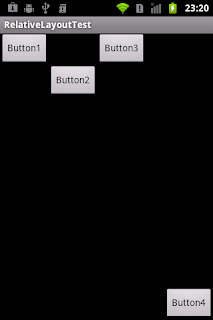
上一篇介紹過如何使用LinearLayout進行元件佈局,但是單靠一種排版方式,設計出來的介面並不豐富,所以Android也有提供其它的排版方式,本篇將介紹如何使用RelativeLayout(相對佈局)進行排版。其它的排版方式會陸陸續續的介紹!!
使用RelativeLayout進行元件佈局
Felix 發表在 痞客邦 留言(0) 人氣(2,694)